Hi everyone! This is the official Cetrix weblog where we post great stuff about our tablets, smartphones and other devices and of course, great educational news and articles.
Broward County Public School
District in Florida has implemented open content caching in an effort to
deliver online content to classrooms faster.
The district's network infrastructure covers 270 sites, including schools,
technology centers and administration buildings, and 225,000 students and
32,000 employees use it on a daily basis to access cloud services, digital
instructional materials, personalized learning and collaboration tools, rich
media activities and online testing. Teachers have been increasing their use of
online educational resources in the classroom, and consequently straining the
district's network capacity.
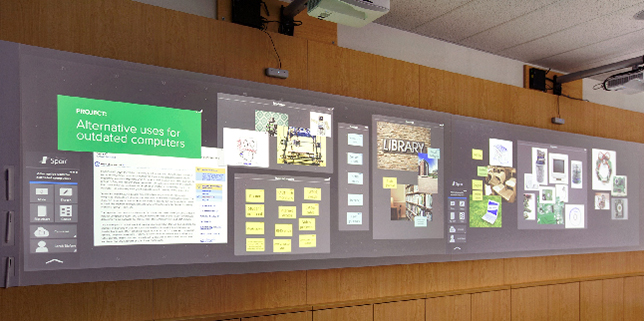
The Nureva Span system lets students create content on their devices and then move it to a larger digital display board.
The Nureva Span allows students to collaborate on a large shared canvas.
A new collaboration system allows students to create content on their
own devices and combine it with that of other students on a 10- or
20-foot digital display board. Nureva
has introduced two models of its Span product, a collaboration system
that uses a cloud-based application to move students' notes, sketches or
images from their personal devices to a shared screen that can be
projected on any large surface (like a classroom wall, for instance).
Once projected, the content can be moved around or changed in any way
desired.
Colorado State University-Global Campus has unveiled new online teacher licensure programs in science and math set to debut this spring.
"The Bureau of Labor Statistics is projecting the number of STEM
occupations will continue to grow significantly faster than other job
areas. Therefore, the need for quality math and science teachers to help
inspire and encourage children to pursue these areas is greater than
ever," said Jon Bellum, provost and senior vice president at Colorado
State University-Global Campus, in a prepared statement. "We are
excited to offer these new teacher licensure programs as a way to help
fulfill this need."
Cyber
Science 3D and Cengage Learning will join forces to produce educational science products for K-12
and higher ed schools and
libraries. The partnership will combine Cyber Science 3D's expertise
with
virtual reality tools and Gale's access to parent company Cengage
Learning's
educational content and resources. Cyber Science 3D will provide the
platform
for Gale's content.
According
to representatives from both companies, the
collection of integrated products will deliver more vivid content that
will
enhance teaching and learning. At the same time, Cengage Learning and
Gale will
provide Cyber Science 3D more access to markets when the first suite of
products is introduced in early 2016.
We
get so caught up in testing that we're forgetting to nurture kids. We
forget that school isn't just a place to learn, but a place to grow and
become a person. That person in charge of that classroom, who kids are
looking up to, needs to be a nurturer and a caregiver, a counselor and a
relationship guru. This person is everything to these kids, because
they may never have had someone like that in their lives.
Yes, the panda got to ring the bell, too.
On the auspicious day of Friday, Nov. 13,
Instructure became
a public company on the New York City Stock Exchange, opening at $16 a
share under the symbol INST and ending the day at $18 a share.
Instructure sold 4.4 million shares, raising approximately $70 million.
Based in Salt Lake City, Instructure offers a cloud-based learning
management system, Canvas, first to universities and more recently to
K-12 schools. The company got started in 2008 by two computer science
graduate students who wanted to create a platform for organizing
learning materials. Their advisor, computer scientist, Josh Coates, had
previously started several companies (Scale Eight and Mozy.com) that
were sold to bigger industry players.
Coates first invested in his students’ venture then rolled up his
sleeves and joined as chief executive in 2010. He brought both a
discipline of how to build a company—and a quirky sense of humor. The
company’s annual user conference,
InstructureCon, has the usual keynotes and panels—interspersed with music, mini-golf and trapeze artists.
If public K-12 invested 2% of its national spending on research and
development (R&D), that would total $12 billion every year.
For perspective, Tesla, widely considered one of the world’s most innovative companies, raised approximately $200 million
for the R&D required to put its first electric vehicles on the
road. With that aforementioned 2%, K-12 could finance 60 new
organizations like Tesla... every year.
Our public schools have big problems worth solving and big
opportunities worth seizing. Yet it is difficult to point to the
breakthroughs that define so many other industries—and it’s equally
unclear who we’d entrust with $100 million to solve a problem that makes
teachers and students better off.
Yet, we believe K-12 should invest significantly more money in
R&D—making smart bets on dozens of “big problems” every year—while
radically changing how those dollars are allocated.
The
flood of edtech tools that teachers are presented with has been
staggering over the last several years, and continues to be this way. A
quick glance on Twitter or any edtech conference program shows this. In
fact, just typing “edtech industry” into a Google search can show the magnitude of the edtech business world.
In my experience, edtech tools tend to revolve around the 4Cs of 21st century skills: Communication, Collaboration, Creativity, and Critical Thinking.
I would argue that there is not "one tool to rule them all" in
education. (In fact, looking for one of those is like looking for a
unicorn. Good luck.) Any tool that is worthy of consideration by a
teacher should first clearly represent how it will impact student
learning: What will my students be able to do when using XYZ? How will
using XYZ in my classroom create a richer learning experience for my
students?
While it’s great to have so many choices, this is also
what can hold a teacher back from trying something new in their
classroom--especially if the tool is cumbersome or does not show
meaningful purpose in students’ learning. But, it’s also up to the
educator him or herself to decide how best to integrate the 4 C’s into
daily lesson plans. It’s safe to say… both educators and companies can
do their part.
And so, let’s start by looking at strategies educators can try when exploring new edtech tools.
What Educators Should Do
Experiment
Don’t
try to use a dozen edtech tools at one time. Don't even try tackling
all 4 Cs at the same time. Pick one or two of these 21st century
learning skills to focus on during the school year and then ask which
tools help students develop those skills. Here are a few that I support:
If you try to use too many tools at once, you’re likely to feel
overwhelmed and become frustrated. Get really good at using one and then
continue on from there. As long as you’re moving forward, don’t get
caught up on how fast you’re moving.
Don’t Try to Stay on Top of it All--And Have 'Sandbox Time'
Teachers,
you know the name of the game in education is “flexibility.” Edtech
tools come, they go, they’re free, then they’re not. It’s the nature of
the beast. This is one of the many great reasons to have a personal
learning network (PLN) that you can tap for advice, resources and ideas.
This also means that you have to keep a “learner first” mindset with
all of these tools that come your way.
Make
the time for “sandbox time" with a tool you’re thinking about using in
your class. Get together with other teachers and practice using it
before you try it out with kids. Then, be sure to get back together with
your colleagues to share your classroom experiences with one another.
You’ll grow, your students will grow and everyone will win.
What Companies Should Do
When It Comes to Pricing, Be Upfront
This
is always a popular topic with edtech companies, isn’t it? If a tool is
"free," does it offer teachers and students enough capabilities that
they can do something useful? If teachers only have a “freemium” option,
is that useful? Will they only get to enjoy, say, 30 days of using the
tool before they are expected to pay?
Look, I get that at the end
of the day, edtech companies are businesses that need to make money.
Teachers and administrators get this, too. Just make it easy for
teachers to understand what they’re getting when they click that sign-up
button. I have seen some edtech tools that make it ridiculously
difficult to locate pricing/trial period information. Don’t make it a
guessing game.
Teachers and administrators--at least the ones who
are paying--don’t have time for this. My personal opinion on this is
that if you want to have a pay version, then great--have it. However,
please offer teachers and students a decent free version to use, too.
I’ve found more often than not that the free version does just fine for
most students and teachers.
Please don’t make your premium
version a budget buster, either. Administrators are the ones having to
constantly find ways to do more with less. Make it a reasonable annual
price and make it clear exactly that the teacher gets (and how it will
benefit student learning). A student tool that I believe does this well
is Kidblog. Yes, they recently started offering a 30-day trial of their
premium version. But even the premium version is affordable at $29 per
year per teacher. For what you get, I think this is a very good value.
Understand Needs By Having Teachers as Advisors
If
an edtech company is 1) not hiring people with education experience
and/or 2) not listening to the direct needs of teachers and students,
then they’re missing the boat. This is the only way that a web tool or
app is going to have an adequate pulse on the true needs of teachers and
students.
Many
companies have had great success by creating an advisory board of
educators, an ambassador program, or something similar. It ensures that
teachers and students have a voice within the organization and it is an
effective, efficient way to continually iterate impact on classrooms.
I
can’t think of a better way for a company to measure their impact on
the 4Cs by seeking opinions and evaluations from teachers. Invite
teachers to try a beta version, participate in virtual focus groups, and
create pilot groups to try out specific components with their students.
Get Out of The Way
I have always said, the best web
tools do a great job at getting out of the way of student learning. This
means they just work and do exactly what the company says they’re going
to do. The login/signup process is simple (hint: let teachers and
students use their Google accounts), it’s seamless for teachers to
manage and share student work, and it’s easy to learn how to actually
use the tool.
For
example, my students shouldn’t have to click six times just to get
started on collaborating with a classmate online. I think of my own
children in this situation: It has become totally normal (not to mention
easy) for them to share a story with me that they’ve written or an
illustration they’ve created in Google Draw. They share it, I leave them
comments, and they keep working. It’s quick, efficient and it’s become
the norm. This should be the case no matter which of the 4Cs the tool is
focusing on.
Again, if you read the point I made before this one, then this should not be an issue.
Whether
you’re a teacher giving some new edtech tools a spin, or a creator of
an edtech tool, I charge you with a great responsibility. If you’re a
teacher, it’s about remaining a learner first and taking some risks. If
you’re making an edtech tool, it’s about truly understanding what
teachers and students need. After all, we’re all in it for the same
reason--student success.
Two years ago, more than 40 million US students could barely stream
online videos. Only 30 percent of K-12 districts provided sufficient
Internet access speed to support digital learning, defined by the
Federal Communications Commission (FCC) at 100 kbps per student.
Today, that number has been slashed nearly in half, with 20 million
more students enjoying Internet speeds that meet the FCC’s goal. A new
report, “
2015 State of the States,” published by San Francisco-based nonprofit by EducationSuperHighway,
found that 77 percent of school districts have hit the target speed. In
all, an estimated 24.5 million students and 1.7 million teachers now
enjoy enough broadband to make the most out of education technology
tools.
These courses combine online and on-ground learning, even as online degree programs are rare in the Arab region.
The use of blended learning is becoming more common at Arab region universities,
and can prove an added benefit to traditional learning for Arab
international students studying in the region. Somali national Zakaria
Mohamed Hagi Hassan is currently taking a mix of in-class and online
learning for his course on advanced crop physiology in the College of
Food and Agricultural Sciences at King Saud University in Riyadh, Saudi Arabia.
Traditional-age college students in online programs can benefit from campus access and success courses.
Because online higher education has generally been aimed at older students, so has most advice for online students.
But with an increasing number of 18- to 24-year-olds turning online for at least some of their undergraduate study, perhaps it's time to update that advice.
Here are five suggestions for traditional college-age students considering a new-age virtual approach to a degree.
Two visionary IT experts discuss the biggest trends in mobile for the
coming year, from 3D touch and virtual reality to wearables and the
Internet of Things.
For years, mobile technologies have had an enormous influence on
higher education, changing the way students communicate, access
information and learn. And there's no sign of mobile losing steam
anytime soon. According to the 2015 NMC Horizon Report,
which forecasted the most important ed tech developments in higher
education, mobile-related trends will rule for at least the next five
years: In the short term, with a time-to-adoption horizon of one year of
less, the bring-your-own-device (BYOD) phenomenon will proliferate; in
the mid-term (two to three years) wearable technologies will see
significant growth; and in the long-term (four to five years), the
Internet of Things (IoT) will have wide-reaching impact.
While
some of you may not even be satisfied with the RTM versions of Windows
10 and are gobbling up the latest bits to come out of Microsoft using the Insider program, many organisations, especially those in the public sector, aren't so lucky.




 While
some of you may not even be satisfied with the RTM versions of Windows
10 and are gobbling up the latest bits to come out of Microsoft
While
some of you may not even be satisfied with the RTM versions of Windows
10 and are gobbling up the latest bits to come out of Microsoft